The Best Video Editing Software for Social Media Creators
If you're an e-commerce creator, your go-to video editor for social media is probably a mobile-first tool like CapCut. It's the top pick for a reason—its mix of speed, trend-focused features, and direct link to TikTok makes it perfect for churning out organic content and ads for platforms like Instagram Reels and TikTok Shop.
Choosing Your Social media Video Editor
Navigating the crowded market of video editors is a real challenge for e-commerce brands. The secret isn't just picking the one with the most features; it's a strategic decision that needs to align with your content velocity, budget, and overall business goals. Think of it as building a "social media tech stack" that can handle both rapid-fire ad creation and a steady stream of organic content.
Your choice really boils down to a few core categories of tools. Each one serves a very different purpose in a modern social media workflow.
The Main Editor Categories
Thinking about these categories helps turn your decision from a simple software choice into a strategic investment in your video marketing ROI.
- Mobile-First Editors: These are apps built for speed and jumping on trends. Think CapCut or InShot. They're perfect for creating daily content for TikTok and Reels right from your phone, letting you react instantly to new sounds and formats.
- Professional Desktop NLEs: This is where the heavy hitters live. Non-linear editors like Adobe Premiere Pro or Final Cut Pro give you absolute creative control. They are the industry standard for high-production brand campaigns, detailed product videos, and long-form YouTube content where every little detail matters.
- AI-Powered Platforms: Tools like Runway or Flair.ai are completely changing the game by automating tedious, complex tasks. They can whip up product videos from a single image, instantly remove backgrounds, or even generate entire scenes, which is a massive time-saver for specific ad creative needs.
The "best" software is simply the one that slots perfectly into your workflow. For a high-volume TikTok Shop seller, speed is everything, making a mobile editor a must-have. But for an established brand focused on long-term identity, a professional NLE is a crucial investment for maintaining quality control.
The market definitely reflects these different needs. While a giant like Adobe Premiere Pro commands 35% of the market, you can't ignore the meteoric rise of mobile editors. CapCut, the free editor from TikTok's parent company, has already carved out a 4% global market share and has become a staple for e-commerce brands that see an average $5 return for every $1 invested in video content. You can discover more insights about video editing software market share to see how the landscape is shifting.
This growth points to a bigger trend: a move toward agile, easy-to-use tools that get content posted fast without a huge drop in quality. Picking the right one is your first step to getting in on that action.
The Right Tool for the Job: Comparing Video Editors for E-commerce
Picking the "best" video editor for social media isn't about finding one tool that does it all. It’s about knowing which editor to grab for which job. The needs of a dropshipper churning out daily ads are worlds apart from a DTC brand crafting a polished seasonal campaign, so let's break down the main categories.
Think of it like a toolbox. You have different tools for different tasks—a quick TikTok ad, a high-production brand film, or a batch of consistent product promos. We’ll look at the three main types—Mobile-First, Template-Driven, and Professional NLEs—through the lens of what actually matters to an e-commerce brand: speed, creative control, consistency, and cost.
Mobile-First Editors: The Need for Speed
When you need to move fast, you edit on your phone. Editors like CapCut and InShot are built for the blink-and-you'll-miss-it pace of vertical video on platforms like TikTok and Reels. Their biggest advantage is speed-to-post. You can literally shoot, edit, and publish content right from your phone in a matter of minutes.
For an e-commerce brand, this is huge. It means you can jump on a fleeting TikTok trend with your product or turn fresh user-generated content (UGC) into a compelling ad before the moment passes. These apps come loaded with the native-looking effects, transitions, and text styles that feel right at home on social media, so your content looks authentic, not like a stuffy corporate ad.
The workflow is dead simple. Pull in a few clips, trim them on a basic timeline, slap a trending sound on top from their built-in library, and hit the auto-caption button. The whole process can take less than 15 minutes. It’s the perfect setup for A/B testing dozens of ad creatives without needing a full-blown video team.
Mobile-first editors are your workhorses for daily organic posts and rapid-fire ad testing. They’re all about speed and relevance, making them essential for high-volume, reactive content.
But that speed comes with a trade-off. While they’re getting more powerful, you just don't get the fine-tuned control over color grading, audio mixing, or complex visual effects that you’d find on a desktop. For a major brand campaign, that can be a dealbreaker.
Template-Driven Platforms: Consistency at Scale
This is where tools like Canva and Promo come in. They sit comfortably between the simplicity of mobile apps and the complexity of professional software. Their main job? Ensuring brand consistency. For any e-commerce business, keeping a cohesive look across all social channels is how you build a recognizable brand.
These platforms are built around Brand Kits. You just preload your logos, brand colors, and fonts one time. From there, you can build out a whole library of reusable video templates for all your recurring content needs:
- Product Announcements: Every new product reveal looks polished and instantly recognizable.
- Customer Testimonials: Just drop new customer footage and quotes into a pre-designed, on-brand format.
- Promotional Offers: Whip up visually consistent sale announcements for Instagram Stories and feed posts in a snap.
Canva, for instance, has thousands of templates already sized perfectly for every social media format you can think of. This takes all the guesswork out of aspect ratios and safe zones, letting a social media manager with zero design experience produce sharp, branded videos on their own. This is your go-to when the goal is producing a large volume of professional-looking content without a steep learning curve.
Professional Desktop NLEs: Unmatched Creative Control
When your creative vision is non-negotiable, you need the heavy hitters. Professional non-linear editors (NLEs) like Adobe Premiere Pro and Final Cut Pro are the industry standard for a reason. These desktop programs give you granular control over every single pixel and sound wave. This level of precision is what you need for those flagship brand campaigns, in-depth product tutorials, or long-form YouTube videos that truly define your brand.
In an e-commerce context, you'd pull out an NLE for the high-production stuff. Think of a cinematic brand story for a YouTube pre-roll ad or a detailed "how-to" video for a technical product. For that kind of project, you need advanced features:
- Advanced Color Grading: Making sure your product colors on screen perfectly match how they look in real life.
- Complex Motion Graphics: Animating your logo or creating sophisticated callouts to highlight key product features.
- Professional Audio Mixing: Blending voiceovers, music, and sound effects for a crystal-clear, immersive experience.
Of course, there's a catch. These tools demand powerful computers, a serious time commitment to learn, and a higher price tag. It's complete overkill for a dropshipper just testing products. But for an established DTC brand investing in high-impact storytelling, that creative freedom isn’t just a nice-to-have—it's essential for cutting through the noise. Using a professional NLE is a strategic decision, reserved for content where quality and creative execution are everything.
To help you decide, here’s a quick breakdown of which editor category fits common e-commerce needs.
Video Editor Comparison for E-commerce Use Cases
| Editor Category | Primary Use Case | Ideal For | Key Strengths | Limitations |
|---|---|---|---|---|
| Mobile-First | Fast-turnaround organic & ad content for TikTok, Reels, Shorts. | Social media managers, solo entrepreneurs, UGC-heavy brands. | Speed-to-post, trend-native effects, ease of use, low cost. | Limited creative control, basic audio/color tools, phone-dependent. |
| Template-Driven | Consistent, on-brand promotional videos and social media assets. | In-house marketing teams, agencies, brands focused on scaling content. | Brand consistency, pre-made templates, ease of collaboration. | Creative constraints within templates, can feel generic if not customized. |
| Professional NLE | High-production brand films, detailed tutorials, flagship campaigns. | Professional videographers, creative agencies, established DTC brands. | Unmatched creative control, advanced effects, professional color/audio. | Steep learning curve, expensive, requires powerful hardware. |
Ultimately, most successful e-commerce brands don't just pick one. They use a mix: a mobile editor for daily engagement, a template platform for consistent promos, and a professional NLE for the big, brand-defining moments.
Essential Features for Social Media Video Success
Picking the right type of editor is a great first step, but it’s only half the story. To really make an impact, the software you choose needs a specific set of features—the non-negotiables designed for the fast, mobile-first world of social media.
These aren't just fancy add-ons; they are core tools that directly influence how your content performs and how fast you can create it. Let's break down the must-haves that will help your e-commerce brand stand out.
Mastering Social Media Formats
First on the list is native support for multiple aspect ratios. This is absolutely critical. Social media isn't a one-size-fits-all game; a video that looks great on a YouTube ad will be a cropped, awkward mess in an Instagram Reel.
Your video editor has to make it dead simple to create and resize content for each platform’s specific dimensions. The best tools offer presets that take out all the guesswork.
- 9:16 (Vertical): The undisputed king of mobile. This is your go-to for TikTok, Instagram Reels, and YouTube Shorts. It fills the whole screen, grabbing maximum attention.
- 1:1 (Square): Still a powerhouse for in-feed posts on Instagram and Facebook. Square videos are balanced, easy to watch, and perform consistently well.
- 4:5 (Vertical): This taller format is perfect for Instagram feed posts. It takes up more precious vertical real estate than a square video but doesn't get awkwardly cut off in the feed preview.
A tool that lets you effortlessly switch between these formats—or even reframe a single project for multiple platforms—is a massive time-saver for any marketing team.
Auto-Captions for Silent Viewers
Think about how you scroll through social media. A huge amount of video is watched with the sound off, whether people are in a quiet office, on public transport, or just prefer to scroll in silence. If your message is locked behind audio, you’re losing a huge slice of your audience.
This is where reliable auto-captioning becomes a game-changer. Modern editors use AI to automatically transcribe your audio into perfectly timed captions. This isn't a luxury anymore; it's a fundamental requirement for accessibility and engagement.
One study found that captioned videos can boost view time by as much as 12%. For an e-commerce brand, that's more than just a vanity metric—it could be the extra few seconds needed to turn a casual scroll into a click and a sale.
Learning how to caption effectively is a key skill. If you want to go deeper, check out a practical guide on how to caption videos for SEO and engagement. The best tools don't just generate the text; they let you customize the font, colors, and style to keep everything on-brand.
Maintaining Brand Consistency with Brand Kits
For any e-commerce business, a recognizable brand is everything. This is where a brand kit feature in your video editor becomes invaluable. Instead of fumbling with hex codes and font files for every single video, you can store all your brand assets in one place for quick access.
A good brand kit lets you preload the essentials:
- Your Brand's Logos: Drop in a watermark or a branded outro in seconds.
- Custom Color Palettes: Keep your text, graphics, and backgrounds consistent with your brand colors.
- Specific Fonts: Ensure your typography matches what customers see on your website and other marketing.
This feature is a lifesaver, especially for teams using template-based editors. It guarantees that every piece of content, no matter who creates it, adheres to the same visual standards. It turns your editor from a simple tool into a true brand asset manager, building the kind of consistency that fosters trust and recognition in a crowded feed.
A Practical Workflow for Creating a TikTok Shop Ad
Talking about features is one thing, but seeing how a tool fits into a real workflow is where the rubber meets the road. Let's walk through a repeatable, high-speed process for creating a winning TikTok Shop ad using a mobile-first editor like CapCut.
This entire process is built for speed. The goal is to get you from a folder of raw clips to multiple, ready-to-test ad variations in under 30 minutes. We're aiming for authentic, native-looking content that stops the scroll and actually drives sales.
Step 1: Get Your Assets in Order
Before you even think about opening an editor, get your raw materials together. For TikTok ads, user-generated content (UGC) is absolute gold. It gives you instant social proof and feels so much more genuine than a slick, overly produced video.
Keep it simple: organize your clips into a dedicated folder on your phone so you can grab them quickly. Here’s what you'll need:
- UGC Clips: Grab 2-3 short clips (think 3-5 seconds each) of a customer unboxing your product or showing it in action.
- Product Shots: A couple of clean, well-lit clips of the product by itself can help clarify exactly what you’re selling.
- CTA Screen: This can be a simple graphic or a quick video clip with your logo and a direct command like "Shop Now" or "Tap to Buy."
Doing this prep work upfront is a game-changer. It means that once you're in the app, your brainpower is focused purely on the creative edit, not hunting for files.
Step 2: Build Your Story and Find Trending Audio
Okay, now it's time to open CapCut. Start a new project and import the clips you just organized. Remember, the first 3 seconds of your ad are everything, so lead with your most compelling UGC clip—that's your hook.
Arrange the clips on your timeline to tell a super-fast story: maybe you start with a problem, introduce your product, show it in use, and then hit them with the call-to-action. Keep each clip short and punchy to maintain a rapid pace.
Next, sound. Tap "Audio" and dive into TikTok's library of trending sounds. Using a popular track makes your ad feel like it belongs on the platform, and it can give your visibility a nice little bump. Pick a sound and trim it to fit your video’s length, which should be somewhere between 7-15 seconds for a TikTok ad.
A key part of building a successful workflow is understanding the platform's culture. As you develop a practical workflow for creating a TikTok Shop Ad, insights from a guide on how to become a TikTok influencer can provide valuable context for content creation.
Step 3: Layer On Text and Captions
With the video structure and sound locked in, it’s time to add text. Your text overlays need to be bold, easy to read, and hammer home your key message. Use CapCut's animated text styles to make them stand out.
A simple, effective formula for your text overlays looks like this:
- The Hook (0-3s): Pose a question or make a bold statement about a customer's pain point. (e.g., "Tired of frizzy hair?")
- The Solution (3-8s): Introduce your product as the answer to that problem. (e.g., "This serum changes everything.")
- The CTA (8-12s): Tell them exactly what to do next. (e.g., "Tap the orange button to shop!")
Once your main text is in place, use the auto-caption feature. Just tap "Text" and then "Auto Captions" to generate subtitles for any talking in your video. This is a non-negotiable step; it ensures your ad is just as effective for people scrolling with the sound off.
Step 4: Create Variations for A/B Testing
Here’s the pro move: never launch just one ad. The real secret to finding a winning creative is to test relentlessly. And luckily, creating variations is incredibly easy right inside your CapCut project.
Just duplicate your finished video and change one key element. You can try out different hooks, test new calls-to-action, or swap in another trending sound. Your goal should be to create 3-5 variations to run against each other in your ad campaign.
- Variation A: Your original version.
- Variation B: Swap the first clip for a different UGC hook.
- Variation C: Change the trending audio to another popular sound.
- Variation D: Rewrite the text overlays to try a different angle.
When you’re done, export all your versions in high resolution (1080p) straight to your camera roll. In just a few minutes, you've batched a set of high-potential ad creatives, ready to be deployed and analyzed—all from a single, streamlined workflow.
Integrating Video into Your E-commerce Funnel
Your video editor is more than just a piece of software; it's the engine that powers your sales funnel. Creating a great video is only the first step. The real magic happens when you strategically place that video across every stage of the customer journey, from a potential customer scrolling their social feed all the way to them clicking "buy" on your Shopify store.
When you start thinking this way, your entire approach to video changes. You stop seeing it as just making a single TikTok, and instead, you see it as creating a core asset you can splinter into a dozen different pieces to fuel your entire marketing machine for a week.
From Social Feed to Product Page
The most powerful way to connect your social media buzz to actual sales is by putting those videos right on your product pages. Whether you're using Shopify or selling directly on TikTok Shop, video offers the kind of social proof and dynamic demonstration that a simple photo just can't deliver.
A short, snappy video on a product page can do wonders for your conversion rates. It answers questions visually, puts the product in a real-world context, and gives shoppers the confidence they need to hit that "Add to Cart" button.
- For Shopify Stores: Grab your best-performing Instagram Reels or TikToks and embed them directly onto the relevant product page. This immediately shows new visitors that your product is trending and gives them authentic content right where they make their purchasing decision.
- For TikTok Shop: Your storefront is already built around video. Make sure your pinned videos are your absolute best-performing ads or most helpful user-generated clips. This is often the very first thing a potential buyer sees.
Placing a video on a landing page can increase conversions by 80% or more. When you bring your social videos into your store, you close the gap between discovery and purchase, creating a smooth and convincing path for the customer.
Repurposing Content for Maximum ROI
An efficient video strategy isn't about constantly creating new things from scratch. It's about working smarter. A single, high-quality video—like a detailed customer review or an in-depth product tutorial—is a goldmine. Your video editor is what lets you slice, dice, and reformat that core asset for every platform you're on.
This approach squeezes every last drop of value out of your initial time investment. Instead of being stuck on the content treadmill, you can create a steady flow of fresh posts from one foundational video.
Here’s a workflow I see successful brands use all the time:
- Start with a Core Asset: You get a great 2-minute video from a customer unboxing and reviewing your product.
- Create Short-Form Clips: Jump into your editor and pull out the three most compelling 15-second soundbites. Those are now three separate TikToks or Reels, each highlighting a different selling point.
- Produce an Animated GIF: Export a silent, 3-5 second looping clip of the most visually satisfying moment. This is perfect for grabbing attention in an email newsletter.
- Make a Feed Post: Create a 1:1 square version of the best 60-second chunk for your Instagram and Facebook feeds, burning in bold captions so it works with the sound off.
With this simple process, one video just became at least five unique pieces of content. Your video editor is the command center that lets you tailor your message for each channel without losing quality or brand consistency. This is how you get your best content in front of the most people, driving engagement and sales everywhere you have a presence.
Choosing the Right Video Editor for Your Business Stage
Trying to find the single "best" video editor for social media is a fool's errand. The real question isn't "what's the best tool?" but "what's the right tool for my business right now?"
The answer completely changes depending on your team size, budget, and what you’re trying to accomplish. What works wonders for a scrappy startup could bring a larger brand's creative workflow to a screeching halt. Let’s break down which type of editor makes sense for different e-commerce scenarios.
For Startups and High-Volume Testers
If you’re a dropshipper or a new Shopify store owner, your game is all about speed and volume. You're probably trying to test 10+ new product ads every single week. In this situation, a heavy-duty desktop editor isn't just overkill—it's a liability. It’s slow, expensive, and a complete waste of time when your goal is rapid-fire testing.
Your best friend here is a mobile-first editor like CapCut. The entire experience is built to pump out TikToks and Reels in minutes. You can stitch together user-generated content (UGC), slap on some trending audio, and crank out ad variations right from your phone. It's the perfect setup for high-velocity A/B testing on a shoestring budget.
When you're still validating products, the speed of creation and deployment trumps cinematic quality every time. A mobile-first workflow means you can keep pace with social media's relentless demand for content without getting bogged down in technical details.
This decision tree gives you a good visual for how different video types fit into the sales funnel, from grabbing initial attention to closing the sale.
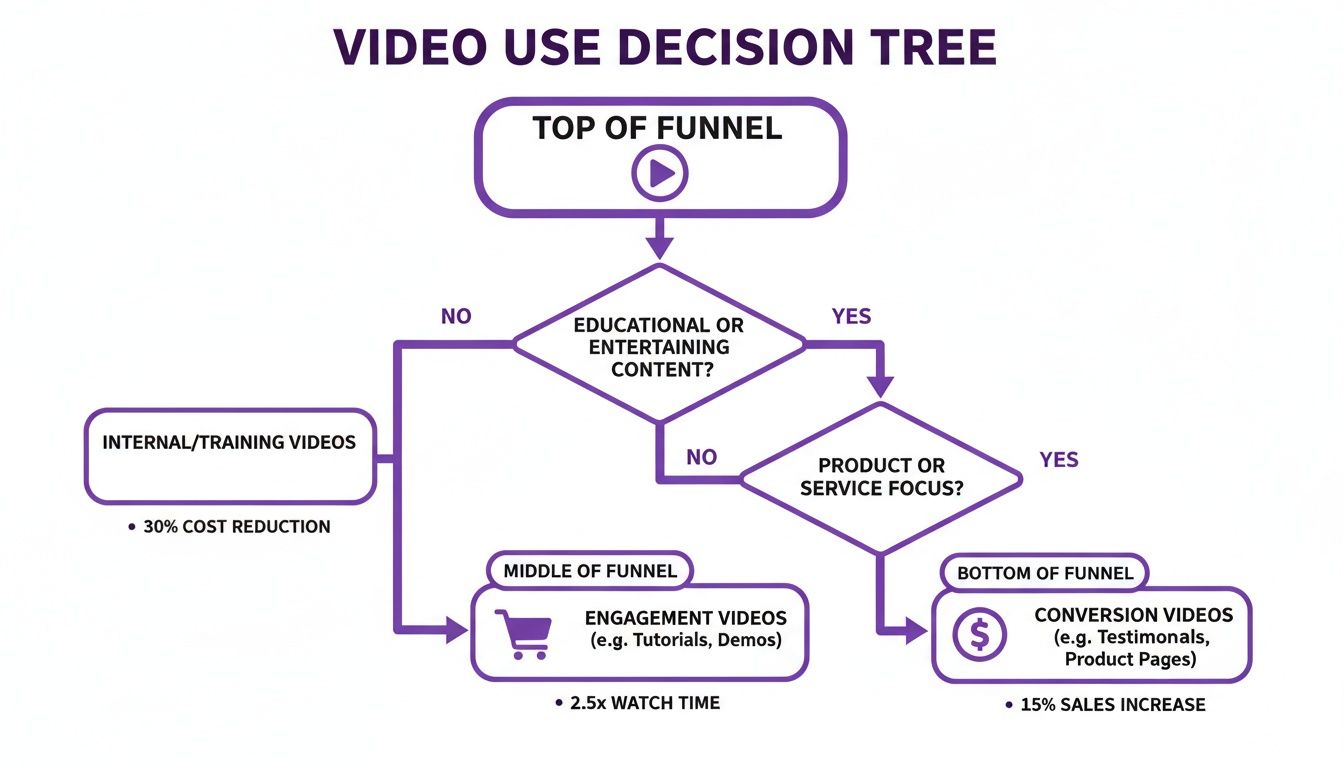
As you can see, top-of-funnel content is all about engagement, while bottom-of-funnel videos need to drive action. This distinction has a huge impact on the tools you'll need.
For Established Brands with Creative Teams
Now, flip the script. An established DTC brand with a dedicated creative team has a totally different set of problems to solve. When you're producing a major brand campaign or a detailed YouTube tutorial, creative control and brand consistency are everything. This is where a professional desktop NLE (non-linear editor) like Adobe Premiere Pro earns its keep.
A professional suite gives you the keys to the kingdom: advanced color grading, sophisticated audio mixing, and high-end motion graphics. Yes, it requires a skilled editor and a bigger budget, but the payoff is creating polished, memorable brand assets that build real equity and cut through the noise.
The Hybrid Approach for Smart Scaling
Most growing e-commerce brands live somewhere in the middle. You need the speed for daily social posts but also the quality for cornerstone campaigns. This is where a hybrid approach—using a stack of different tools for different jobs—is the smartest way to scale.
This is also where bundled subscriptions can be a game-changer. For example, a service like EcomEfficiency can give you access to a curated suite of tools. You might get Canva for building consistent, on-brand templates for promos and CapCut for churning out quick-turnaround social content.
This lets you scale your creative output without paying for a dozen different expensive subscriptions. You can whip up daily TikToks on the fly while still maintaining a polished, professional look for your main promotions.
At the end of the day, the right video editor is the one that fits your current resources and goals, while giving you a clear path to grow tomorrow.
Frequently Asked Questions
Jumping into social media video editing can feel like a maze. Let's clear up some of the most common questions e-commerce creators ask.
What's the Best Free Video Editor for TikTok Ads?
Hands down, CapCut is the best free option for TikTok ads. It’s made by the same company that owns TikTok, so the integration is incredibly smooth. You get direct access to a massive library of trending sounds and effects, which helps you make ads that look and feel like native content.
The free version is surprisingly powerful, too. It comes packed with features like auto-captions and high-resolution exports, which is more than enough for most e-commerce brands to get started without spending a dime.
Do I Really Need a High-End Computer for This?
Not at all. The gear you need really just depends on the software you're using.
- Mobile and Cloud-Based Editors: Apps like CapCut or Canva are designed to work perfectly on your phone, tablet, or a standard laptop. They do all the heavy lifting in the cloud or right on your device, so you don’t need a powerhouse machine.
- Desktop Software: This is where things get serious. A professional NLE like Adobe Premiere Pro will demand a lot from your computer—think a fast processor, a dedicated graphics card, and plenty of RAM. It's necessary for handling high-resolution files and complex effects without constant crashing.
Honestly, for most social media content, a high-end computer is overkill. Your smartphone is probably powerful enough to do the job.
What’s the Ideal Length for My E-commerce Videos?
The perfect video length depends on the platform and what you want to achieve. The goal is always to grab attention fast, so stick to the ‘hook, hold, CTA’ framework.
When it comes to ads on TikTok and Instagram Reels, the sweet spot is usually between 7-15 seconds. That's just enough time to highlight a problem (the hook), show how your product solves it (the hold), and tell people what to do next (the CTA).
For organic posts on your Instagram feed, aim for under 60 seconds. This helps keep people engaged long enough to get your message across. No matter the length, a strong hook in the first couple of seconds is everything.
Stop juggling dozens of software subscriptions and start saving. With EcomEfficiency, you get bundled access to 50+ premium tools like CapCut, Canva, Midjourney, and Semrush for one low monthly price. You can cut your software costs by up to 99% and simplify your entire e-commerce workflow. Unlock your all-in-one toolkit at EcomEfficiency today.